Did a static test in driveway with my Lonelec BT Adapter. Need to wait till the boss is working on monday before I can try it during a drive.., but a quick connection

-
Welcome to the ElgrandOC forum. You will find that the majority of the forum is locked, but do not worry. You can unlock more content by registering to the forum completely free. Sign up is automatic, does not require email confirmation and is instant. Feel free to browse through the sections to see what topics have been covered before you register. You can register for an account by CLICKING HERE Once you have registered, you will unlock more of the forum content. You will not unlock all of the content until you have reached 10 posts. This is to give you an opportunity to chat to existing members and help to integrate you into the forum community. We are a friendly and helpful community and there is a wealth of infomation contained within the forum. Please feel free to register, introduce yourself and get to know your fellow members. Feel free to look at the Frequently Asked Questions section, the Meets/Events section and the Competition Section without having to register. We look forward to getting to know you and help you with any questions or problemd you have with your Elgrand.
You are using an out of date browser. It may not display this or other websites correctly.
You should upgrade or use an alternative browser.
You should upgrade or use an alternative browser.
Elgrand Android APP
- Thread starter KKOK
- Start date
- Messages
- 101
- Reaction score
- 235
- Points
- 123
- Location
- Yorkshire
- First Name
- Kevin
- Elgrand
- E51
- Region
- Yorkshire
Hey! It connected! When you've played about with it a bit send me the log files & details of your dongle make & van series / engine. Ta

- Messages
- 18
- Reaction score
- 23
- Points
- 53
- Location
- Yeovil, Somerset, UK
- First Name
- Jon
- Elgrand
- E51
- Region
- South West
KevI built an android app for my own E51 (a S1 2002 Highway Star on LPG) to allow me to read / reset fault codes without a JOBD reader or using my laptop, anyway the functionality has grown to be a full on e51 Elgrand diagnostic / health monitoring tool, It's turned out well enough that I think it could be useful to other members, so I'm happy to share it.
I should say up front that I'm not an Elgrand expert & relied on this forum for advice to develop the app. The E51 uses Nissan's own Consult-II protocol rather than generic OBD-II, so I logged and decoded / reverse engineered my own van's Consult-II signals (a bit of a pain to do & may contain misinterpretations of signals / data). There's a lot of knowledge on this forum that I don't have, and your input would make a real difference to finishing it properly & rolling out to the forum.
What it does
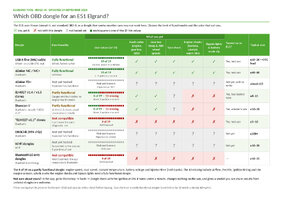
What you need: an Android phone or head unit (Android 8 or newer), and a Bluetooth OBD dongle. The vLinker MC is the one that's been tested.
- How: Downloads from Android Play Store, runs off your android headunit or phone / tablet. Connects to a (good) Elm327 or STN OBD dongle (I used a vLinker MC+), can also connect by VAG K line cable.
- Fault codes: reads and clears codes from the engine, gearbox, ABS and airbag modules off your phone / headunit.
- Cat monitoring: compares the rear lambda sensors with the front ones, and bank 1 with bank 2, and tracks the trend over weeks to attempt to flag the early signs of a failing cat.
- Health checks: fuel trims (petrol and gas), all four lambda sensors, alternator and battery (including the voltage dip while cranking), coolant, gearbox temperature and warm idle. Each check gives a plain-English verdict and the figures behind it. For best output the app needs to run on every drive and data collects over time to show trends.
- MPG: live, per trip and per tank, kept separately for petrol and LPG. It calibrates itself from data pushed by the van.
- LPG gauge: tracks gas used and remaining, with a range estimate (no more resetting trip counter).
- Trip log: every drive is logged with distance, fuel and cost.
- Head-unit dashboard and Android Auto: a live view of the van with every reading shown. The head unit or phone connects by itself every drive.
- Workshop: service and MOT reminders, a soft-tyre check using the ABS sensors, and active tests (these only run when the van is parked and idling).
- Garage report: Health report & log outputs you can share and analyse away from the van.
View attachment 122135
Looking for beta testers
So far it's only been tested on my S1 van. Before I share it with the forum properly, I'm after a handful of E51 owners to help iron out the creases. Petrol and LPG vans are both welcome. It would also help to hear from anyone who knows these vans well and can tell me when a verdict or a reading doesn't look right. There's a Report button in the app that bundles up everything I need.
Nothing leaves your phone unless you choose to share it. It's free, with no account and no adverts, and it's an independent project that I'm happy to share with the forum if useful.
If you're interested, PM me and I'll send you the test link - I think I'll limit it to a few initially to make sure others can connect / use as I do.
Cheers, Kev
I've just joined these forums today. I have just bought an E51 and happen to run a small IT company, so this is right up my street. I've just ordered a vLinker MC off of Amazon.
I was starting to think about how to fix up the funky stuff in this elderly gadget trolley and your project got me thinking.
Yes, let's grab the data off the CAN bus via Bluetooth (had no idea they existed). Mine comes with a leisure battery so I can run up something like a Rasp Pi on board to store the data and either sort out an internets for the van (Starlink or similar) or store locally on board and dump data via wifi to my home server on return to the mothership.
I'm a fan of Home Assistant and the approach used in your app looks like a great fit for that. The beauty of doing it via HA is that HA has a phone app too and that allows you to encompass many apps. Basically you just need to get the data to HA and then you have access to all of the HA facilities.
Anyway, I'll look into all that stuff. Once the dongle has arrived I'll request access for testing
Nice work
Cheers
Jon
- Messages
- 1,404
- Reaction score
- 5,620
- Points
- 333
- Location
- Birmingham
- First Name
- michael
- Elgrand
- E51
- Region
- Midlands
Hello and welcomeKev
I've just joined these forums today. I have just bought an E51 and happen to run a small IT company, so this is right up my street. I've just ordered a vLinker MC off of Amazon.
I was starting to think about how to fix up the funky stuff in this elderly gadget trolley and your project got me thinking.
Yes, let's grab the data off the CAN bus via Bluetooth (had no idea they existed). Mine comes with a leisure battery so I can run up something like a Rasp Pi on board to store the data and either sort out an internets for the van (Starlink or similar) or store locally on board and dump data via wifi to my home server on return to the mothership.
I'm a fan of Home Assistant and the approach used in your app looks like a great fit for that. The beauty of doing it via HA is that HA has a phone app too and that allows you to encompass many apps. Basically you just need to get the data to HA and then you have access to all of the HA facilities.
Anyway, I'll look into all that stuff. Once the dongle has arrived I'll request access for testing
Nice work
Cheers
Jon
- Messages
- 101
- Reaction score
- 235
- Points
- 123
- Location
- Yorkshire
- First Name
- Kevin
- Elgrand
- E51
- Region
- Yorkshire
Morning JonKev
I've just joined these forums today. I have just bought an E51 and happen to run a small IT company, so this is right up my street. I've just ordered a vLinker MC off of Amazon.
I was starting to think about how to fix up the funky stuff in this elderly gadget trolley and your project got me thinking.
Yes, let's grab the data off the CAN bus via Bluetooth (had no idea they existed). Mine comes with a leisure battery so I can run up something like a Rasp Pi on board to store the data and either sort out an internets for the van (Starlink or similar) or store locally on board and dump data via wifi to my home server on return to the mothership.
I'm a fan of Home Assistant and the approach used in your app looks like a great fit for that. The beauty of doing it via HA is that HA has a phone app too and that allows you to encompass many apps. Basically you just need to get the data to HA and then you have access to all of the HA facilities.
Anyway, I'll look into all that stuff. Once the dongle has arrived I'll request access for testing
Nice work
Cheers
Jon
It'd be great to get you testing, the vLinker should open up full app functionality for you. Let me know when the dongle lands & I'll get you access as a tester on Play Store - I need your Google email to register you if you can DM me?
- Messages
- 101
- Reaction score
- 235
- Points
- 123
- Location
- Yorkshire
- First Name
- Kevin
- Elgrand
- E51
- Region
- Yorkshire
Elgrand Tool 1.0-RC1 · build 46 is on Google Play today!
Thank you to everyone who sent logs. Most of these changes came from them.
If something's not right, go to Workshop > Report.
Thank you to everyone who sent logs. Most of these changes came from them.
- Head units connect by themselves when the app comes on screen, so your phone no longer needs to be paired.
- Reconnects by itself after the screen blanks while cranking engine
- Fixes issues when the Bluetooth link drops
- Dongles that can't talk to an Elgrand are named in Setup
- New Dongle check (Workshop → Tools) tests your adapter
- ELM clone dongles now also read the gearbox and ABS
- Smoother dials on slower dongles
- One lambda/catalyst verdict on every screen
- Currency setting; fuel prices in pence or cents
- Clearer battery wording
If something's not right, go to Workshop > Report.

- Messages
- 101
- Reaction score
- 235
- Points
- 123
- Location
- Yorkshire
- First Name
- Kevin
- Elgrand
- E51
- Region
- Yorkshire
Hi. No, it's on Play Store but as a Test App - I need your google email DM'd to add you to a testers list - then you get a link, click on that and it opens up in Google Play (Joe Public can't see it until it's debugged by us and released proper). TaDoes the app have regional restrictions as it's not showing on French Google.

- Messages
- 13,351
- Reaction score
- 40,290
- Points
- 473
- Location
- Normandie
- First Name
- André
- Elgrand
- E51
- Region
- Rest Of World
Ok no probs, I just side loaded the updated apk you sent so all good.Hi. No, it's on Play Store but as a Test App - I need your google email DM'd to add you to a testers list - then you get a link, click on that and it opens up in Google Play (Joe Public can't see it until it's debugged by us and released proper). Ta
Is that now an updated version on the App store?

- Messages
- 2,553
- Reaction score
- 5,765
- Points
- 383
- Location
- Teesside
- First Name
- Mark
- Elgrand
- E50
- Region
- North East
I have a facelift E50 with the 3.5 and same JOBD, happy to test it in mine and see if it'll work for some E50 users 
At the moment I use NDSii with a basic ELM Bluetooth module which works for basic things like EML diagnostic and clearing...
At the moment I use NDSii with a basic ELM Bluetooth module which works for basic things like EML diagnostic and clearing...
- Messages
- 101
- Reaction score
- 235
- Points
- 123
- Location
- Yorkshire
- First Name
- Kevin
- Elgrand
- E51
- Region
- Yorkshire
Morning - absolutely. DM your Google email and I can add you to the Google Play Store testers list - you will get a link to download. TaI have a facelift E50 with the 3.5 and same JOBD, happy to test it in mine and see if it'll work for some E50 users
At the moment I use NDSii with a basic ELM Bluetooth module which works for basic things like EML diagnostic and clearing...
- Messages
- 101
- Reaction score
- 235
- Points
- 123
- Location
- Yorkshire
- First Name
- Kevin
- Elgrand
- E51
- Region
- Yorkshire
Sorry, I've no experience of a E52; I think they use a completely different diagnostic system Consult 3?Any idea if this will work with an e52

- Messages
- 908
- Reaction score
- 2,087
- Points
- 333
- Location
- Coseley, Wolverhampton
- First Name
- Paul
- Elgrand
- E51
- Region
- Midlands
I would like to have ago with the app if I may. Thank you
- Messages
- 101
- Reaction score
- 235
- Points
- 123
- Location
- Yorkshire
- First Name
- Kevin
- Elgrand
- E51
- Region
- Yorkshire
Morning. Please DM your Google email & I'll register you as a tester on Play Store - you will then get a link to download from Play Store.I would like to have ago with the app if I may. Thank you
Thanks
Last edited:
